 Features
•
21 November 2026
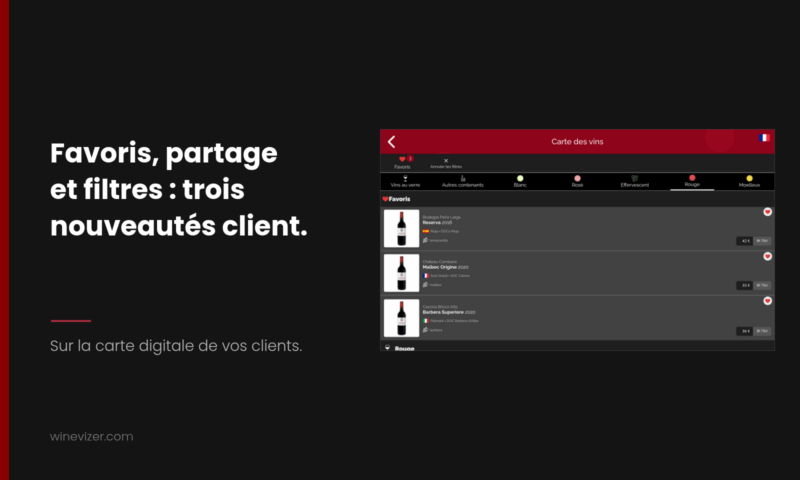
Three small features have just been added to the digital wine list your guests open with the QR code: save wines as favourites with a heart, share the sheet of a wine through their phone's share menu, and cancel every filter in one move. The first is not on by default: you switch it on in the configuration of your wine list, in a few clicks.
A digital wine list is judged by what it saves the guest. Someone comparing three bottles, wanting to show a reference to a friend, or who has stacked several filters and is looking for a way back to the full list, loses time on a detail. Each of these three features removes one of those small obstacles.
When the feature is on, each wine sheet carries a heart-shaped button. The guest taps the heart of a wine to set it aside. A Favorites chip then appears in the bar of the list with the number of wines kept, and a Favorites section gathers those wines at the top of the list. The guest compares their two or three candidates without scrolling through the whole list again.
Three things to know:
The setting is off until you change it.
On the sheet of a wine, a Share button opens the native share menu of the guest's phone: they find the apps installed on their device, messaging, mail or notes, and Winevizer does not impose a channel. The message sent contains the name of the wine, its estate and its appellation, with a link.
This link is specific to that wine. Whoever receives it, even if they have never opened your list, lands on the list of your establishment with the wine sheet already open. In practice: a guest who finds a wine they like can send it to a friend before booking, and the friend arrives directly on your list, at the right wine.
The button only appears when the guest's browser can open this share menu, and never on the room tablet. There is nothing to set on your side.
When the guest has applied one or more filters, a Reset filters chip appears in the bar of the list. One tap removes them all and brings back the full list. It disappears by itself when no filter is active. There is nothing to switch on either.
Open your digital wine list on your phone, as a guest would, and try all three: apply two filters then reset them, share a wine to your own notes to see the link arrive. If favourites suit you, switch them on from the configuration of the list, then reopen it to see the hearts.
No digital wine list yet? The free digital wine list lets you build a first version before you switch on these options.
Need a clearer, more profitable, and easy-to-update restaurant wine list? Discover a concrete method, examples of structure, pricing tips, and the advantages of digital (QR code, tablet, virtual sommelier) with Winevizer.<\/p>
Are you thinking of deploying tablets in your restaurant? Discover how to choose the equipment, structure your menu (and your digital wine list), manage costs, and maximize ROI without degrading the in-room experience.<\/p>

Sommelier and restaurateurs: adopt a balanced wine list that combines classic grand cru wines and authentic natural wines to meet the varied expectations of your clientele and optimize your offering.<\/p>
For 1 month with no commitment